
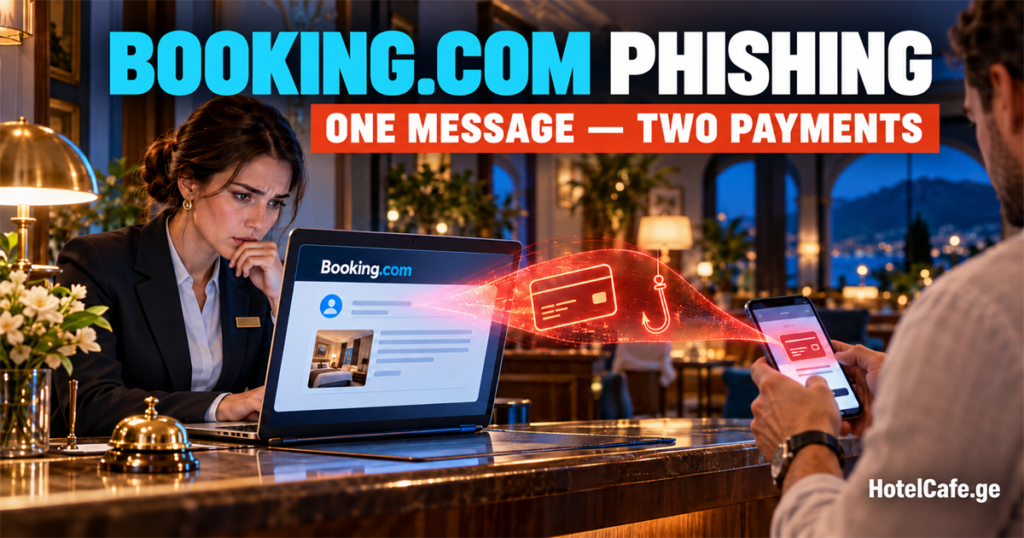
Booking.com phishing often starts not with a guest, but on the hotel administrator’s computer. An employee receives a complaint or a booking question, attackers gain access to a work account, and then use the real hotel’s identity to demand another payment from guests. The message looks convincing because it contains genuine personal data and booking details.
Below are two documented campaigns and a practical response plan that a small hotel can use without an in-house cybersecurity team.
Important: these schemes usually do not involve a breach of Booking.com’s servers. The UK’s Action Fraud says the compromise of individual accounts most likely began with a targeted attack against a hotel or another accommodation provider, not Booking.com’s infrastructure.
How Booking.com phishing works: the guest who paid twice
In 2025, Sekoia researchers investigated a campaign they called I Paid Twice. The name came from the subject line of a victim’s email; according to Sekoia’s assessment, the guest paid for the booking twice — once to the hotel and once to the criminals.
The attack unfolded in two stages.
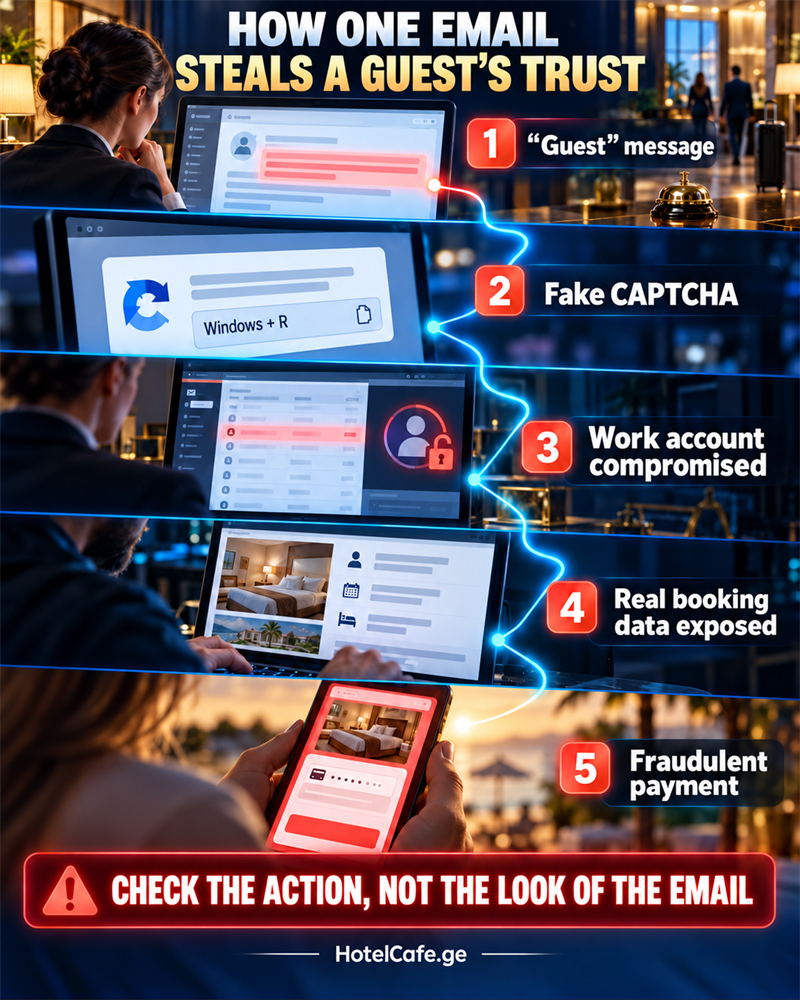
- The reservations team or hotel administration received an email made to look like a Booking.com notification, such as a “new last-minute reservation” or a “new guest message”.
- The link opened a page resembling Booking.com with a fake CAPTCHA. It instructed the employee to perform several actions in Windows. In reality, the employee was launching a malicious command.
- The installed malware gained access to the work computer and credentials for professional Booking.com, Expedia and other booking accounts.
- Once the account was compromised, the criminals could see real reservations. Guests received a WhatsApp message or email containing genuine booking details and a link to a fake Booking.com-style payment page.
- The guest “verified the card” or paid for the booking again, but the money went to the criminals.
Sekoia had observed the campaign since at least April 2025, and it was still active in early October. Researchers identified hundreds of related fake domains. This was not a single rogue email but an organised business: some groups infected hotels, others sold stolen access, and others defrauded guests.
A newer 2026 scenario: bedbug complaints and a ZIP file with “photos”
In June 2026, Microsoft described another active campaign targeting hospitality businesses in Europe and Asia. The emails displayed the sender name Booking Manager (via Calendly) and abused legitimate Calendly infrastructure and Google redirects. As a result, the usual check — “the message passed SPF, DKIM and DMARC, so it must be safe” — could fail.
The subjects were designed to make staff act quickly: a guest complaint, bedbugs in the room, the threat of an inspection, possible property suspension, or poor room conditions. The recipient was asked to follow a link and download a ZIP archive supposedly containing photos. Inside was a file disguised as an image; running it gave the attackers persistent access to the computer.
The practical lesson for hotels is simple: a dangerous email does not have to be badly written, and it does not have to arrive from an obviously fake address. If a message threatens the hotel’s reputation and demands that an external file be opened immediately, verify it separately from the email itself.
Why guests trust a fake payment link
After an account takeover, the criminal is not contacting people at random. Sekoia found that attackers had access to guests’ personal information and genuine booking details. These may include, for example:
- the guest’s name and the hotel name;
- arrival and departure dates;
- the price of the stay;
- the reservation number.
The message can appear in a familiar conversation, by email, or in WhatsApp. It usually creates urgency: “your card could not be verified”, “your booking will be cancelled within two hours”, or “payment must be confirmed again”. The link leads to a page designed to resemble Booking.com.
Action Fraud data shows the scale of the problem: between June 2023 and September 2024, the UK service received 532 reports with total losses of £370,000. In every such case, the hotel’s reputation is also damaged because the message appears to come from a property the guest trusted.
Seven warning signs every hotel administrator should know
| What the employee sees | Why it is dangerous | What to do instead |
|---|---|---|
| A complaint or question from a “guest” without a name or reservation number | Mass campaigns use generic wording | Find the booking manually in the extranet; do not open the email link |
| An urgent demand to verify the account or the property will be suspended | Time pressure discourages verification | Open Booking.com from a saved bookmark and check notifications there |
| A PDF or link followed by a CAPTCHA | The CAPTCHA may be part of a fake page | Close the page and contact support through the official website or app |
| Instructions to press Win+R, paste text, open PowerShell or Terminal | A legitimate human verification never asks you to run a system command | Run nothing; disconnect the device from the network if the command was already executed |
| A ZIP archive containing “complaint photos” | It may contain a file disguised as an image; in Microsoft’s documented campaign it was a shortcut disguised as PNG | Ask the guest to send images through the official chat without an archive |
| A request to sign in to Booking.com again after following an email link | The page may steal the login, password and verification code | Open the extranet separately by typing the address yourself |
| An unexpected request to change payment or contact details | A compromised account is often used for further fraud | Require a second approval by the owner or general manager |
Spelling mistakes are no longer the main sign of phishing. Modern messages can be polished and sent through a legitimate service. Instead of judging how the message looks, check what action it is trying to make the employee perform.
What a small hotel should set up before an attack
1. Secure business email first, then OTA accounts
Resetting the Booking.com password will not help much if a criminal already controls the mailbox used for notifications and account recovery. Business email, Booking.com, other OTAs, the PMS and cloud storage all need separate passwords and two-factor authentication. Booking.com explicitly recommends that partners enable 2FA.
The strongest available option is a hardware security key or an authenticator app. An SMS code is better than no second factor, but offers weaker protection. Even 2FA is not a complete defence: malware on the computer may steal an already authenticated session.
2. Do not share one login across the team
Each employee should have an individual account with only the permissions required for the job. Once a month, the owner or manager should review the user list and remove former employees, contractors and unknown devices. A front-desk administrator should not be able to change bank details or create new administrators unless the role genuinely requires it.
3. Use a dedicated profile or computer for reservations
The device used for Booking.com and the hotel PMS should not be used to install random applications, access personal email or download files from messengers. Daily work should be done from a standard Windows account without administrator rights. The operating system, browser and antivirus software should update automatically.
4. Establish one rule: no commands for a CAPTCHA
A legitimate CAPTCHA may ask you to select images or tick a box. It will not ask you to open Run, PowerShell or Terminal, paste a command, or install an “update”. Print this rule and keep it next to the reservations computer.
5. Open the extranet only from a bookmark
A message may describe a real issue, but staff should verify it independently: open a saved Booking.com bookmark, find the reservation manually or call support using contact details from the official site. Never use a phone number or link from a suspicious email.
6. Define one payment procedure
Tell guests in advance:
- when prepayment is required;
- which domain may send a payment link;
- whether the hotel will ever ask for card details by WhatsApp or email;
- which phone number guests can use to verify a request.
If the payment procedure changes unexpectedly, staff must not send a new link without a manager’s approval. This simple rule reduces the chance that a compromised account immediately becomes a financial loss for a guest.
7. Prepare a one-page incident plan
It should contain official contact details for Booking.com and other OTAs, the acquiring bank, the hotel’s IT specialist, CERT-GE and the person responsible inside the hotel. Add a short action sequence and a prepared guest notice. During an attack, it is too late to search for these contacts in the same compromised mailbox.
If an employee has already followed the link: the first 60 minutes
The response depends on what happened. The risk is lower if the employee only opened the page and entered nothing. If they entered a password or 2FA code, downloaded an archive, pressed Win+R, pasted a command or ran a file, treat the incident as serious.
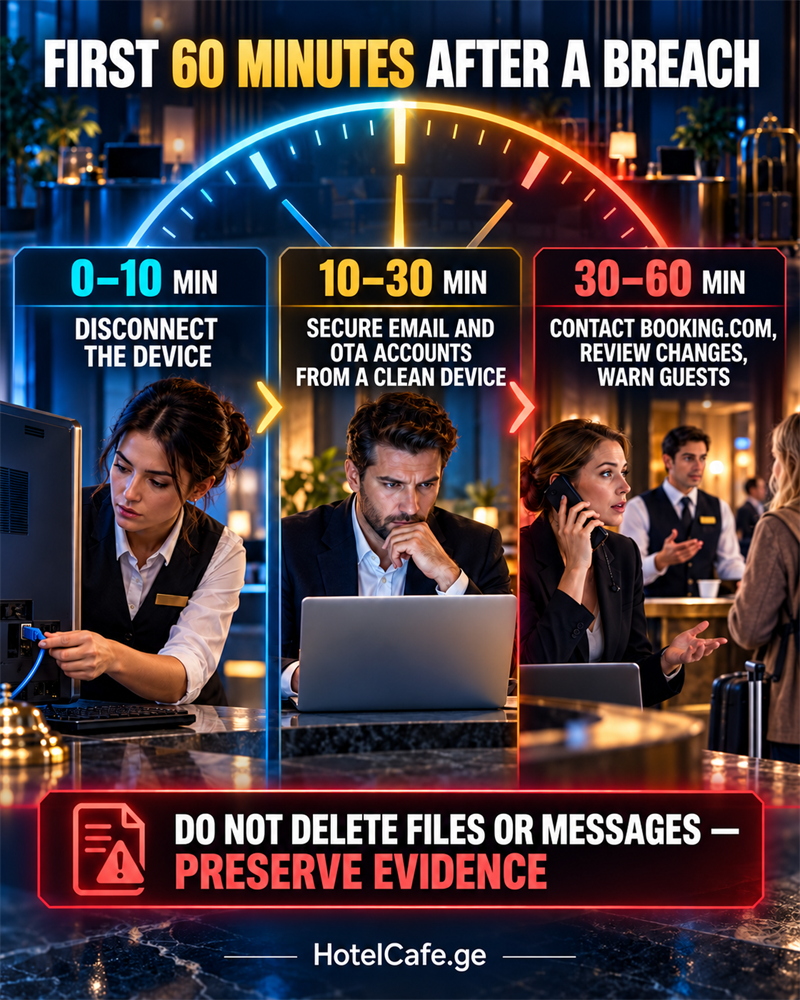
1. Isolate the device. Disconnect Wi-Fi and the network cable. Do not use that computer to change passwords or continue working in the PMS. Preserve files and messages as evidence; decide whether to reinstall the system together with an IT specialist.
2. Secure email from a clean device. Change the password, terminate all active sessions, and review recovery methods, forwarding rules, connected applications and unknown devices. Then do the same for Booking.com, other OTAs, the PMS and payment services.
3. Contact Booking.com through an official channel. Report a possible partner-account takeover, ask support to terminate unauthorised sessions, and determine which messages were sent and which guests’ data may have been viewed. Do not follow a support link from the suspicious email.
4. Review all changes. Check for new users, phone numbers and email addresses, bank details, payment links, message templates and guest correspondence. Do not stop at Booking.com: the malware may have stolen access to every service open on the computer.
5. Warn guests through an independent channel. Contact first the guests who received messages after the suspected compromise. Do not wait for the first victim to call. If someone entered card details or paid, tell them to contact their bank or payment provider immediately.
6. Preserve a timeline. Record when the email arrived and when the link was opened, what the employee did, page addresses, screenshots, email headers, filenames, affected reservation numbers and every response action. The platform, bank, IT specialist and public authorities may need this information.
A ready-to-use warning for guests
Important message from [hotel name]. We have detected unauthorised access to one of our work accounts. Do not follow any links sent earlier and do not confirm a payment or card details. Your booking remains [confirm status]. If you have already entered card details or made a payment, contact your bank immediately. You can verify this message by calling [official phone number] or emailing [official email address]. We apologise and will provide further information after our review.
The hotel should not state that “there was no data leak” until this has been confirmed. It is better to share only verified facts, identify a safe contact channel and give the guest a specific action.
What hotels in Georgia must consider
If an unauthorised person obtained access to guests’ names, contact details, dates of stay, correspondence or payment information, this may be a personal-data incident.
Under Article 29 of Georgia’s Law on Personal Data Protection, the controller must record the incident, its consequences and the measures taken. The State Audit Office must be notified within 72 hours of discovery, unless significant harm or a substantial threat to people’s rights and freedoms is least likely. If the risk of serious harm is high, Article 30 requires affected individuals to be informed immediately or without undue delay in clear language.
This does not mean that every suspicious click automatically requires a mass notification. The hotel must, however, record the event immediately, establish whether data was accessed, assess the risk and consult a data-protection specialist when in doubt. Waiting until the internal investigation is complete is dangerous: the 72-hour period begins when the incident is detected.
A technical incident can be reported to CERT-GE through the official website form or at cert@cert.ge. CERT-GE also offers a service for checking suspicious emails.
Key takeaway
A small hotel is not attacked because it has an “interesting database”. It is attacked because it has access to real bookings and the trust of its guests. One infected computer is enough to give a criminal a convincing story, genuine data and a communication channel in the hotel’s name.
The minimum viable defence is individual staff access, 2FA, opening OTA extranets only from bookmarks, banning commands and ZIP attachments from emails, a clear payment procedure and a prepared incident plan. This costs less than rebuilding the trust of a guest who paid a criminal through a link sent in your name.
Sources
- Microsoft Threat Intelligence: phishing campaign using fake CAPTCHA and malicious commands, March 2025
- Microsoft: Photo ZIP campaign targeting hospitality, June 2026
- Sekoia: I Paid Twice investigation
- Action Fraud: warning about compromised hotel accounts
- Booking.com: safety guidance for partners
- CISA: multifactor authentication for small and medium-sized businesses
- Georgia’s Law on Personal Data Protection
- CERT-GE: incident reporting contacts
- CERT-GE: suspicious email checking service